Unity 程序基础小框架
常用教学向模块化架构:单例 → 缓存池 / 事件中心 / Mono 桥接 / 资源加载。
目标:降低耦合、复用对象、减少 GC、让非 MonoBehaviour 类也能用 Update / 协程。
目录
框架总览
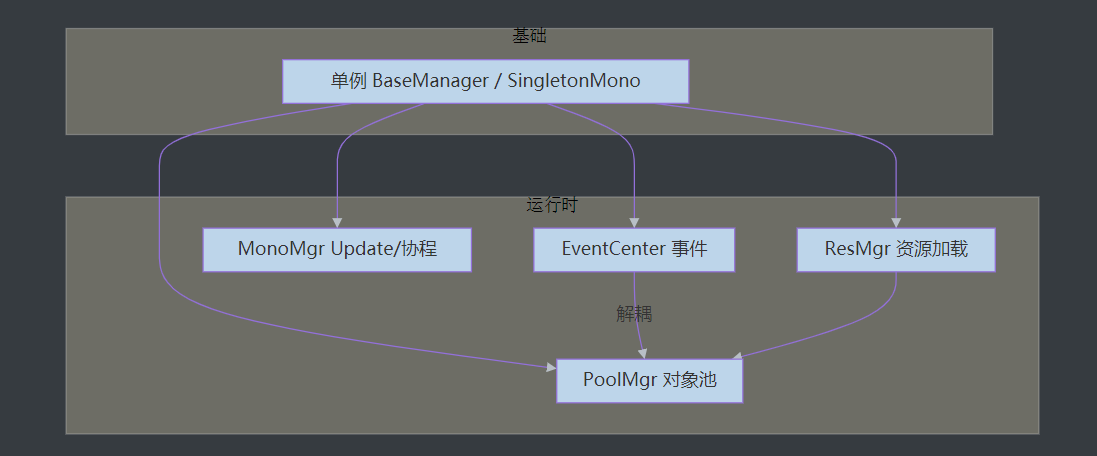
| 模块 | 基类 | 作用 |
|---|
| 普通单例 | BaseManager<T> | 纯 C# 管理类,可 new |
| Mono 单例 | SingletonMono<T> / SingletonMonoAuto<T> | 挂场景或自动创建常驻物体 |
| 对象池 | SingletonMonoAuto<PoolMgr> | 复用 GameObject,少 Instantiate/Destroy |
| 事件中心 | BaseManager<EventCenter> | 字符串事件 + 委托,观察者模式 |
| Mono 管理 | BaseManager<MonoMgr> | 非 Mono 类注册 Update、开协程 |
| 资源加载 | BaseManager<ResMgr> | Resources 同步/异步加载 |
Unity 中常用的 Inspector 特性
| 特性 | 作用 |
|---|
[Header("text")] | 分组标题 |
[Space] / [Space(h)] | 空白间距 |
[Tooltip("text")] | 悬停提示 |
[SerializeField] | 私有字段显示在 Inspector |
[HideInInspector] | 隐藏 public 字段 |
[Range(min, max)] | 数值滑条 |
[TextArea] / [Multiline] | 多行字符串 |
[ColorUsage(showAlpha)] | 颜色选择器是否含 Alpha |
[EnumFlags] | 枚举多选 |
[ContextMenu("name")] | 组件右键菜单调用方法 |
[RequireComponent(typeof(T))] | 自动添加依赖组件 |
[ExecuteInEditMode] | 编辑模式下也执行 |
[GUIColor(r,g,b,a)] | 属性行颜色(Odin 等扩展常见) |
[LabelText("name")] | 自定义显示名(Odin) |
第 12 条 [InspectorButton] 为第三方(如 Odin)特性,Unity 内置无此 Attribute。
第 16–18 条为旧版 Image Effect 相关,URP/HDRP 项目中较少使用。
自定义类要在 Inspector 显示:
1
2
| [System.Serializable]
public class PlayerConfig { public int hp; }
|
单例模式基类模块
思路
- 纯 C# 管理器:
static + 泛型 BaseManager<T> - 需挂场景 / 用协程:
MonoBehaviour 单例
注意:继承 MonoBehaviour 的脚本不能 new,只能 AddComponent 或拖挂载。
1. 普通单例(非 Mono)
 1
 2
 3
 4
 5
 6
 7
 8
 9
10
11
12
13
14
| public class BaseManager<T> where T : new()
{
private static T _instance;
public static T Instance
{
get
{
if (_instance == null)
_instance = new T();
return _instance;
}
}
}
|
使用:class EventCenter : BaseManager<EventCenter> { } → EventCenter.Instance
2. Mono 单例(场景内唯一)
 1
 2
 3
 4
 5
 6
 7
 8
 9
10
11
12
13
14
15
16
| public class SingletonMono<T> : MonoBehaviour where T : MonoBehaviour
{
private static T instance;
public static T Instance => instance;
protected virtual void Awake()
{
if (instance != null && instance != this)
{
Destroy(gameObject);
return;
}
instance = this as T;
}
}
|
子类重写 Awake 时需 base.Awake()。
3. Mono 单例(自动创建 + 常驻)
 1
 2
 3
 4
 5
 6
 7
 8
 9
10
11
12
13
14
15
16
17
18
19
20
21
22
23
24
25
26
27
28
29
| public class SingletonMonoAuto<T> : MonoBehaviour where T : MonoBehaviour
{
private static T instance;
public static T Instance
{
get
{
if (instance == null)
{
GameObject obj = new GameObject(typeof(T).Name);
instance = obj.AddComponent<T>();
DontDestroyOnLoad(obj);
}
return instance;
}
}
protected virtual void Awake()
{
if (instance != null && instance != this)
{
Destroy(gameObject);
return;
}
instance = this as T;
DontDestroyOnLoad(gameObject);
}
}
|
| 类型 | 适用 |
|---|
BaseManager<T> | EventCenter、MonoMgr、ResMgr |
SingletonMono<T> | 场景中预先放好一个物体 |
SingletonMonoAuto<T> | PoolMgr 等全局自动创建 |
缓存池模块
作用
- 减少反复
Instantiate / Destroy 带来的 GC 与卡顿 - 对象停用后放入池,需要时再取出激活
- 代价:长期占用一块内存
GC 简述
创建对象申请内存;Destroy 往往先断开引用,由 GC 在内存紧张时回收。池化可避免频繁分配。
PoolMgr 实现
 1
 2
 3
 4
 5
 6
 7
 8
 9
10
11
12
13
14
15
16
17
18
19
20
21
22
23
24
25
26
27
28
29
30
31
32
33
34
35
36
37
38
| using System.Collections.Generic;
using UnityEngine;
public class PoolMgr : SingletonMonoAuto<PoolMgr>
{
private Dictionary<string, List<GameObject>> poolDic =
new Dictionary<string, List<GameObject>>();
/// <summary>从池中取物体;池空则 Resources 实例化</summary>
public GameObject GetObj(string name)
{
GameObject obj = null;
if (poolDic.TryGetValue(name, out var list) && list.Count > 0)
{
obj = list[0];
list.RemoveAt(0);
}
else
{
obj = Instantiate(Resources.Load<GameObject>(name));
}
obj.SetActive(true);
return obj;
}
/// <summary>放回池中(Deactivate)</summary>
public void PushObj(string name, GameObject obj)
{
obj.SetActive(false);
if (!poolDic.ContainsKey(name))
poolDic[name] = new List<GameObject>();
poolDic[name].Add(obj);
}
}
|
原笔记 bug:else 分支只 Add 了空 List,没有把 obj 放进列表,已在上文修正。
使用示例
1
2
3
| GameObject bullet = PoolMgr.Instance.GetObj("Bullet");
// ...
PoolMgr.Instance.PushObj("Bullet", bullet);
|
可扩展:父节点 poolRoot、预加载数量、超时清理、与 ResMgr 配合 Addressables。
事件中心模块
作用
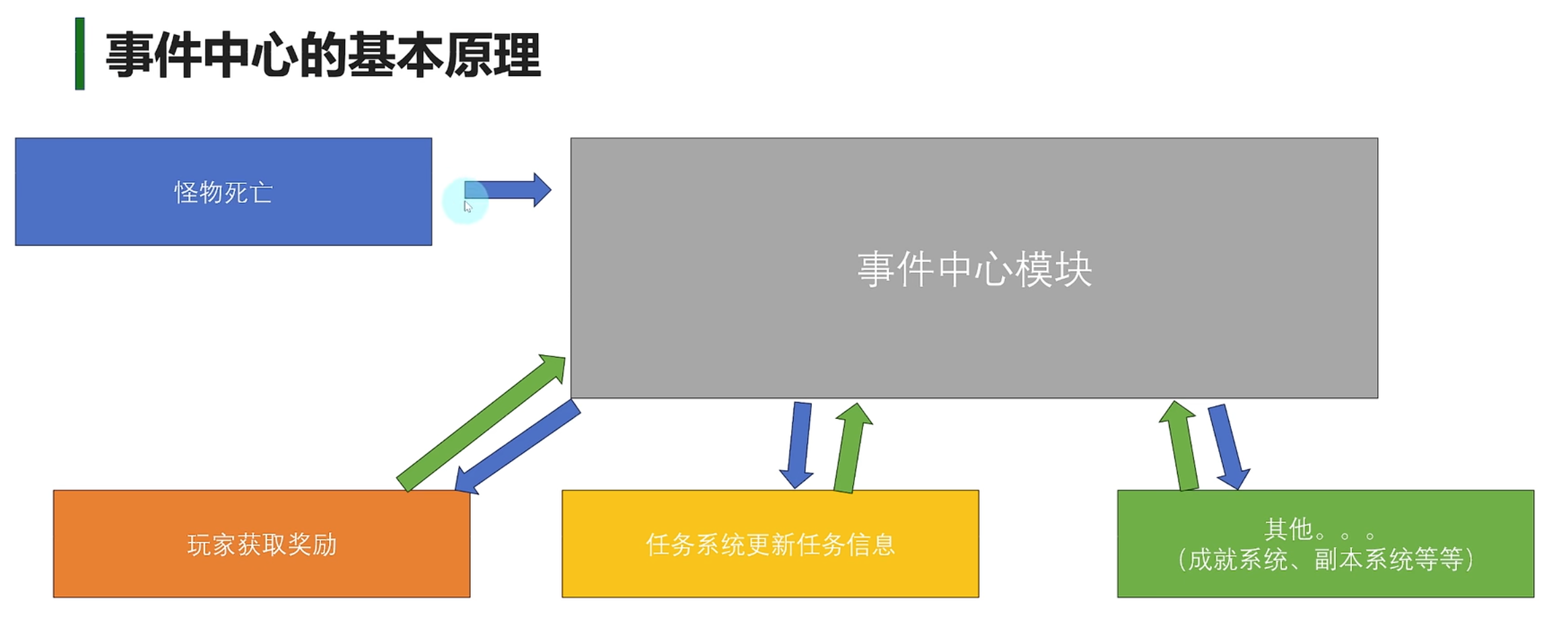
- 避免脚本互相
GetComponent 强引用 - 观察者模式:发布 / 订阅分离,降低耦合
- 容器:
Dictionary<string, UnityAction<object>> - 支持:注册、移除、触发、清空
EventCenter 实现
 1
 2
 3
 4
 5
 6
 7
 8
 9
10
11
12
13
14
15
16
17
18
19
20
21
22
23
24
25
26
27
28
29
30
31
32
33
34
35
36
37
38
| using System.Collections.Generic;
using UnityEngine;
using UnityEngine.Events;
public class EventCenter : BaseManager<EventCenter>
{
private Dictionary<string, UnityAction<object>> eventDic =
new Dictionary<string, UnityAction<object>>();
public void AddEventListener(string eventName, UnityAction<object> action)
{
if (eventDic.ContainsKey(eventName))
eventDic[eventName] += action;
else
eventDic.Add(eventName, action);
}
public void EventTrigger(string eventName, object info = null)
{
if (eventDic.TryGetValue(eventName, out var action))
action?.Invoke(info);
}
public void RemoveEventListener(string eventName, UnityAction<object> action)
{
if (!eventDic.ContainsKey(eventName)) return;
eventDic[eventName] -= action;
if (eventDic[eventName] == null)
eventDic.Remove(eventName);
}
/// <summary>场景切换时建议清空,避免野引用</summary>
public void Clear()
{
eventDic.Clear();
}
}
|
原方法名 EventTigger 建议改为 EventTrigger。
发布者(Monster)
 1
 2
 3
 4
 5
 6
 7
 8
 9
10
11
12
13
14
15
| public class Monster : MonoBehaviour
{
void Start() => StartCoroutine(DeadCoroutine());
public void Dead()
{
EventCenter.Instance.EventTrigger("MonsterDead", this);
}
IEnumerator DeadCoroutine()
{
yield return new WaitForSeconds(3f);
Dead();
}
}
|
顺序:若广播时还没有订阅者,回调不会执行。应先 AddEventListener 再 EventTrigger,或用延迟/初始化阶段统一注册。
订阅者(Player)
 1
 2
 3
 4
 5
 6
 7
 8
 9
10
11
12
13
14
15
16
17
| public class Player : MonoBehaviour
{
void Start()
{
EventCenter.Instance.AddEventListener("MonsterDead", OnMonsterDead);
}
void OnMonsterDead(object info)
{
Debug.Log("Monster dead: " + info);
}
void OnDestroy()
{
EventCenter.Instance.RemoveEventListener("MonsterDead", OnMonsterDead);
}
}
|
必须在 OnDestroy 里移除监听,否则对象销毁后仍被委托引用 → 内存泄漏。
无参事件(扩展)
可用 UnityAction 或泛型 EventCenter<T>,避免处处 (object) 强转。
公共 Mono 模块
作用
- 让不继承 Mono 的类也能:
- 注册 Update(统一在一个
MonoBehaviour 里跑) - 开启 / 停止协程
- 减少满场景都是
Update 的空转(仍是一个 Update 分发,按需注册)
MonoController(挂在场景物体上)
 1
 2
 3
 4
 5
 6
 7
 8
 9
10
11
12
13
14
15
16
17
18
19
20
| using UnityEngine;
using UnityEngine.Events;
public class MonoController : MonoBehaviour
{
private event UnityAction updateEvent;
void Start()
{
DontDestroyOnLoad(gameObject);
}
void Update()
{
updateEvent?.Invoke();
}
public void AddUpdateListener(UnityAction fun) => updateEvent += fun;
public void RemoveUpdateListener(UnityAction fun) => updateEvent -= fun;
}
|
MonoMgr(对外接口)
 1
 2
 3
 4
 5
 6
 7
 8
 9
10
11
12
13
14
15
16
17
18
19
20
21
22
23
24
25
26
27
28
29
30
| using System.Collections;
using UnityEngine;
using UnityEngine.Events;
public class MonoMgr : BaseManager<MonoMgr>
{
private MonoController controller;
public MonoMgr()
{
GameObject obj = new GameObject("MonoController");
controller = obj.AddComponent<MonoController>();
Object.DontDestroyOnLoad(obj);
}
public void AddUpdateListener(UnityAction fun) =>
controller.AddUpdateListener(fun);
public void RemoveUpdateListener(UnityAction fun) =>
controller.RemoveUpdateListener(fun);
public Coroutine StartCoroutine(IEnumerator routine) =>
controller.StartCoroutine(routine);
public void StopCoroutine(Coroutine routine) =>
controller.StopCoroutine(routine);
public void StopAllCoroutines() =>
controller.StopAllCoroutines();
}
|
使用示例
 1
 2
 3
 4
 5
 6
 7
 8
 9
10
11
12
13
14
15
16
17
18
19
20
| public class Test : MonoBehaviour
{
void Start()
{
var logic = new TestLogic();
MonoMgr.Instance.AddUpdateListener(logic.OnUpdate);
MonoMgr.Instance.StartCoroutine(logic.Run());
}
}
public class TestLogic
{
public void OnUpdate() => Debug.Log("Update from non-Mono class");
public IEnumerator Run()
{
yield return new WaitForSeconds(1f);
Debug.Log("Coroutine from non-Mono class");
}
}
|
资源加载模块
概念
| 方式 | 特点 |
|---|
同步 Resources.Load | 阻塞主线程,加载完立刻可用 |
异步 ResourceRequest | 不卡帧,完成后在回调里使用资源 |
正式项目更推荐 Addressables / AssetBundle;教学框架常用 Resources 文件夹。
Lambda 与委托(回调写法)
1
2
3
4
5
| // 无返回值
UnityEngine.Events.UnityAction<GameObject> onLoaded = (obj) => { /* 使用 obj */ };
// 有返回值
Func<string, int> fn = (value) => 1;
|
异步加载必须在回调里实例化或赋值,不能 LoadAsync 后立刻 Instantiate(资源尚未完成)。
ResMgr 实现
 1
 2
 3
 4
 5
 6
 7
 8
 9
10
11
12
13
14
15
16
17
18
19
20
21
22
23
24
25
26
27
28
29
30
31
32
33
34
35
36
37
38
39
40
41
42
43
44
45
46
47
48
| using System;
using System.Collections;
using UnityEngine;
using UnityEngine.Events;
using Object = UnityEngine.Object;
public class ResMgr : BaseManager<ResMgr>
{
/// <summary>同步加载 Resources 下资源</summary>
public T Load<T>(string path) where T : Object
{
return Resources.Load<T>(path);
}
/// <summary>同步加载并实例化预制体</summary>
public GameObject LoadGameObject(string path)
{
GameObject prefab = Load<GameObject>(path);
return prefab != null ? Object.Instantiate(prefab) : null;
}
/// <summary>异步加载资源</summary>
public void LoadAsync<T>(string path, UnityAction<T> callback) where T : Object
{
MonoMgr.Instance.StartCoroutine(LoadAsyncCoroutine(path, callback));
}
private IEnumerator LoadAsyncCoroutine<T>(string path, UnityAction<T> callback)
where T : Object
{
ResourceRequest request = Resources.LoadAsync<T>(path);
yield return request;
callback?.Invoke(request.asset as T);
}
/// <summary>异步加载并实例化</summary>
public void LoadGameObjectAsync(string path, UnityAction<GameObject> callback)
{
LoadAsync<GameObject>(path, prefab =>
{
if (prefab != null)
callback?.Invoke(Object.Instantiate(prefab));
else
callback?.Invoke(null);
});
}
}
|
使用示例
1
2
3
4
5
6
7
8
9
| // 同步
GameObject go = ResMgr.Instance.LoadGameObject("Prefabs/Enemy");
// 异步 + Lambda
ResMgr.Instance.LoadGameObjectAsync("Prefabs/Enemy", obj =>
{
if (obj != null)
obj.transform.position = Vector3.zero;
});
|
与对象池配合
1
2
3
4
5
| // 异步加载预制体 → 首次 Instantiate → 之后走 PoolMgr
ResMgr.Instance.LoadAsync<GameObject>("Bullet", prefab =>
{
// 预热:预先 Push 若干发
});
|
模块协作与注意点
推荐初始化顺序
- 场景放置或自动创建
PoolMgr / MonoController(MonoMgr 构造时创建) EventCenter、ResMgr 首次访问 Instance 时创建- 各玩法脚本在
Start 中注册事件、Update - 场景切换:
EventCenter.Instance.Clear(),按需清理池
常见问题
| 问题 | 处理 |
|---|
| 事件不触发 | 订阅晚于广播;检查事件名拼写 |
| 内存泄漏 | OnDestroy 移除事件;池与常驻单例慎引用已销毁对象 |
| 异步资源为空 | 路径不含扩展名;文件在 Resources 下;等回调再使用 |
| 单例重复 | Awake 里 Destroy 重复实例 |
| Mono 双份 Update | 既在自己 Update 里写逻辑,又注册 MonoMgr,避免重复 |
可扩展方向
| 模块 | 说明 |
|---|
| SceneMgr | 封装 SceneManager.LoadScene + 加载 UI + 进度 |
| UIMgr | 面板栈、Resources/Addressables 加载 UI 预制体 |
| MusicMgr | BGM / SFX 池化 AudioSource |
| TimerMgr | 基于 MonoMgr.Update 的倒计时、间隔调用 |
| 存档 DataMgr | JSON / PlayerPrefs,与事件中心解耦 UI |
